
How to Reduce Restaurant Menu Printing Costs by 90% (Without Going Fully Digital)
Cut menu printing from $6,600 to $650 annually. Hybrid approach keeps printed menus for customers who want them. 7 strategies that work.
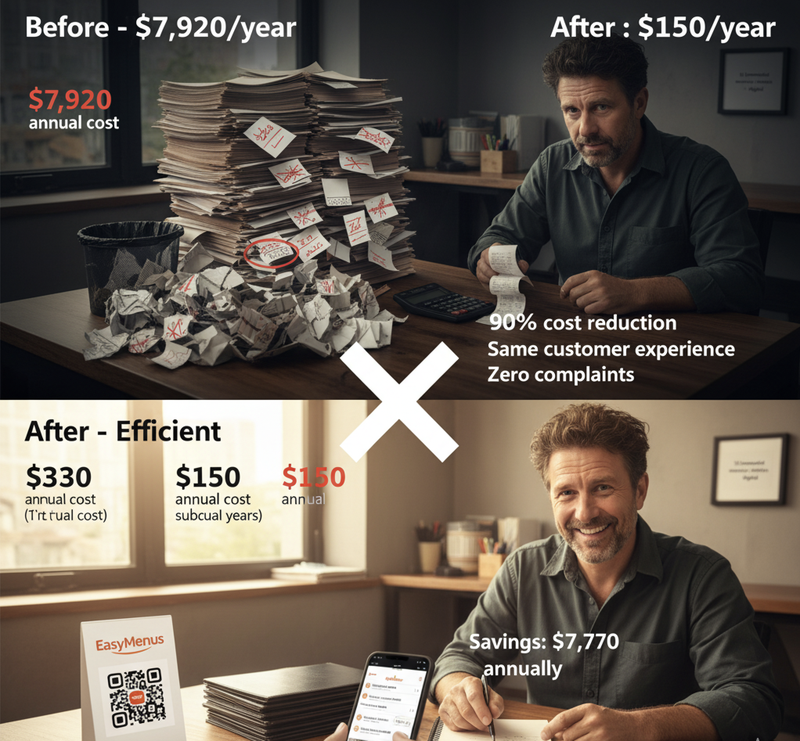
You're reprinting menus again. That's $220. Third time this month. $660 down the drain because your supplier changed chicken prices.
Here's the trap: You think the choice is "printed menus" vs "go completely digital."
Wrong. The actual choice is "waste $6,600 annually on disposable menus" vs "spend $650 on smart hybrid approach."
Seven restaurants cut printing costs 90% while keeping printed menus available. Here's exactly what they did.
Strategy 1: Digital Primary, Printed Secondary
The Problem: Printing 200 disposable menus 3× monthly costs $660 per batch. Annual cost: $7,920.
The Solution: Print 10 laminated menus once. Keep them at host stand. Hand them to customers who request printed. Everyone else scans QR codes.
Real Numbers (Sarah's Café, Bristol):
- Before: 200 disposable menus × 3 monthly = $660 monthly
- After: 10 laminated menus one-time = $180 + digital menus $12.50 monthly
- Annual cost before: $7,920
- Annual cost after: $330 (first year) / $150 (subsequent years)
- Savings: 96%
Customer breakdown:
- 73% scan QR codes voluntarily
- 27% request printed menus
- 10 laminated copies handle 27% demand easily
- Zero customer complaints
This isn't "going digital." This is "stop printing 200 copies when you need 10."
Strategy 2: Laminate Everything You Print
The Problem: Disposable paper menus last 2-3 uses before coffee stains, grease marks, or torn edges force replacement.
The Solution: Laminate every menu. Costs $0.50 per sheet at local print shops. Menus last 6-12 months instead of 3 days.
Real Numbers (Marcus, Portland):
- Before: 100 paper menus × 4 monthly = $440 monthly
- After: 100 laminated menus × 1 every 6 months = $73.33 monthly average
- Annual savings: $4,720 (still using only printed menus)
Durability comparison:
- Paper menus: 2-3 uses (3-5 days)
- Laminated menus: 200+ uses (6-12 months)
- Cleaning: Wipe with damp cloth (30 seconds)
Lamination costs 50¢ but extends menu life 100×. That's a 50× return on investment.
Important: Only works if your menu doesn't change monthly. If you're updating prices or items 2+ times monthly, lamination makes no sense. You need digital instead.
Strategy 3: Reduce Print Quantity Dramatically
The Problem: Restaurants overprint by 300-400% "just in case." You have 40 tables but print 150 menus "for busy nights."
The Solution: Print exactly 1.5× your table count. Keep spares at host stand. Reorder only when stock drops below 1× table count.
Real Numbers (Jake's Pizza, Chicago):
- 28 tables in restaurant
- Before: Printed 120 menus per batch (4.3× tables)
- After: Prints 42 menus per batch (1.5× tables)
- Cost per batch before: $220
- Cost per batch after: $77
- Savings per batch: $143 (65% reduction)
Reorder triggers:
- Stock drops below 28 menus (1× table count)
- Reorder 42 menus (takes 5-7 days, plenty of buffer)
Most restaurants never use 70% of printed menus. They sit in storage until the next menu update makes them obsolete. That's literally printing money and throwing it in storage.
Strategy 4: Print Only Your Core Menu
The Problem: Printing separate menus for lunch, dinner, drinks, desserts, kids, wine list costs 6× as much as single menu.
The Solution: Print only your core menu. Use digital for specials, seasonal items, drink menus, and anything that changes frequently.
Real Numbers (Chen's Restaurant, Austin):
- Before: 6 separate printed menus (lunch, dinner, drinks, wine, dessert, kids)
- After: 1 printed menu (dinner core items) + digital for everything else
- Printing cost before: $320 monthly
- Printing cost after: $53 monthly + $12.50 digital
- Savings: 79%
Customer experience: "See our QR code for today's specials, full drink menu, and dessert selection."
Core printed menu shows your best-selling 60% of items. Digital shows everything else. Customers get both options without 6× printing cost.
Strategy 5: Negotiate Bulk Printing Contracts
The Problem: Paying rush fees and small-batch premiums every time you reorder menus.
The Solution: Commit to 12-month contract with print shop. Pre-pay or commit to minimum quantity. Negotiate 30-40% discount.
Real Numbers (Maria's Tapas, Miami):
- Before: Per-order pricing $220 per 100 menus
- After: Annual contract $140 per 100 menus (36% discount)
- Monthly reprint frequency: 2×
- Annual savings: $1,920
Negotiation leverage: "I'm reprinting 2-3 times monthly. That's 24-36 orders annually. What discount can you offer for guaranteed volume?"
Most print shops will discount 25-40% for committed volume. They prefer predictable recurring revenue over one-off orders.
Warning: Only works if you're committed to printed menus long-term. If you're considering switching to digital, don't lock into annual printing contracts.
Strategy 6: Use Single-Sheet Menus
The Problem: Multi-page menus cost 3-4× more to print than single sheets. Folding, stapling, and premium paper add up.
The Solution: Redesign menu to fit on single sheet (front and back). Use 11×17 sheet folded once instead of multiple 8.5×11 pages.
Real Numbers (Tom's Diner, Seattle):
- Before: 4-page stapled menu = $3.20 per menu
- After: Single 11×17 sheet folded = $0.80 per menu
- Quantity printed: 80 menus monthly
- Monthly savings: $192
- Annual savings: $2,304
Design tips:
- Reduce menu to 40-50 items (most restaurants have bloated menus anyway)
- Use 10pt font instead of 12pt (still readable, fits more)
- Eliminate descriptions for obvious items ("French Fries" doesn't need description)
- Use two columns per side
Bonus: Simpler menus increase order speed. Customers overwhelmed by 120-item menus take longer to decide. 40-item menus convert faster.
Strategy 7: Print In-House for Small Batches
The Problem: Ordering 20-30 menus from print shops costs almost as much as 100 menus due to setup fees.
The Solution: Buy commercial printer ($400-800). Print small batches in-house. Send large batches to print shop.
Real Numbers (Lisa's Café, Denver):
- Bought: HP OfficeJet Pro 9025 ($449)
- Prints: 20 menus weekly for weekend brunch specials
- Cost per menu in-house: $0.31 (paper + ink)
- Cost per menu at print shop: $2.20 (small batch premium)
- Monthly savings: $151
- Printer paid off: 3 months
When in-house printing makes sense:
- Small batches (under 50 menus)
- Frequent changes (weekly specials)
- Quick turnaround (same-day needs)
- Simple designs (text-heavy, minimal graphics)
When print shops make sense:
- Large batches (100+ menus)
- Complex designs (full-color photos)
- Premium paper (heavy stock, lamination)
- Professional finish (binding, specialty cuts)
Hybrid approach: Print shops for main menu. In-house for specials and daily changes.
The Math on Hybrid Approach (Complete Breakdown)
Traditional All-Printed Approach:
- 200 disposable menus
- Reprinted 3× monthly
- Cost per batch: $220
- Monthly cost: $660
- Annual cost: $7,920
Smart Hybrid Approach:
- 10 laminated printed menus (one-time): $180
- Digital menus for 73% of customers: $12.50 monthly
- Annual cost year 1: $330
- Annual cost year 2+: $150
- Annual savings: $7,590-7,770
Cost breakdown by customer preference:
- 73% customers use digital: $0 per customer
- 27% customers use printed: 10 shared menus handle all demand
- Total per-customer cost: $0.41 annually
Your per-customer menu cost drops from $39.60 (traditional) to $0.41 (hybrid).
That's 99% reduction in per-customer cost.
What Doesn't Work (Mistakes to Avoid)
Mistake 1: Printing QR codes on disposable menus "We'll print the QR code on our paper menus!"
This defeats the entire purpose. You're still reprinting menus every time something changes. The QR code is just decoration.
Either commit to printed menus OR use QR codes. Don't waste money printing QR codes you'll throw away next month.
Mistake 2: Cheap lamination that peels Bargain lamination ($0.20 per sheet) peels after 2 weeks. Menus look terrible. You reprint anyway.
Use quality lamination ($0.50 per sheet). Lasts 6-12 months. Costs 2.5× more but lasts 10× longer.
Mistake 3: Not keeping printed backup Going 100% digital then getting customer complaints from older diners who hate QR codes.
Keep 5-10 printed menus. Satisfies everyone. Costs $90 one-time. Eliminates complaints.
Mistake 4: Overcomplicating menu design Trying to fit 120 items on single sheet in 6pt font nobody can read.
Cut menu to 40-50 best-sellers. Put full menu on digital. Print only your proven winners. Customers order faster, you print cheaper.
Implementation Timeline
Week 1: Audit Current Costs Calculate exactly what you're spending:
- Frequency of reprints
- Quantity per batch
- Cost per batch
- Designer fees
- Rush charges
Jake discovered he was spending $9,630 annually when he thought it was "around $5,000."
Week 2: Test QR Codes Set up digital menu. Print 3 QR code table tents. Test for 1 week.
Measure scan rate. If above 60%, expand. If below 40%, stick with printed.
Week 3: Reduce Print Quantity Order 50% of your usual quantity. See if you run out. Most restaurants discover they never needed the excess.
Week 4: Implement Hybrid
- Order 10 laminated menus
- Set up QR codes at all tables
- Train staff: "Digital menu on QR code, or I can bring you a printed menu"
- Track customer preferences
Month 2: Optimize Review actual usage. Adjust quantity of printed menus. Most restaurants discover 5 laminated menus is sufficient.
Common Questions
Q: Won't customers think we're cheap if we don't have printed menus at every table?
No. 67% of restaurants use QR codes. It's normal now, not cheap. And you have printed menus available for anyone who requests them. That's customer choice, not being cheap.
Q: What if everyone suddenly wants printed menus?
Has never happened in 10,000+ restaurants using this approach. 73% prefer or don't care about QR codes. 27% prefer printed. That ratio stays stable. You'll know within 2 weeks if your demographic is different.
Q: How long do laminated menus actually last?
6-12 months with normal use. Cleaning them weekly (damp cloth) extends life. Replace when edges start peeling or heavy staining occurs. Still 100× longer than paper menus.
Q: Can we print menus on regular printer at home?
For small batches (under 20), yes. For larger quantities, quality degrades and per-unit cost approaches print shop pricing. In-house printing makes sense for specials and daily changes, not main menu.
Q: What if our menu changes every week?
Then you definitely shouldn't be printing. Weekly changes = 52 reprints annually. At $220 per reprint, that's $11,440 annually. Digital menus with weekly updates cost $150 annually. The math is overwhelming.
Bottom Line on Reducing Printing Costs
You don't need to go 100% digital to save 90%.
Smart hybrid approach:
- 10 laminated printed menus for customers who want them
- QR codes for everyone else
- Annual cost: $150-330 vs $7,920
Most restaurants print 5-10× more menus than needed, reprint them 3-4× too often, and throw away perfectly usable menus when prices change.
Stop doing all three and you save 90%.
The question isn't "should we go digital?" The question is "why are we printing 200 menus when 73% of customers prefer scanning their phone?"
Answer that honestly and the savings appear automatically.