
Digital Menu Setup: 30 Minutes From Photos to Operational
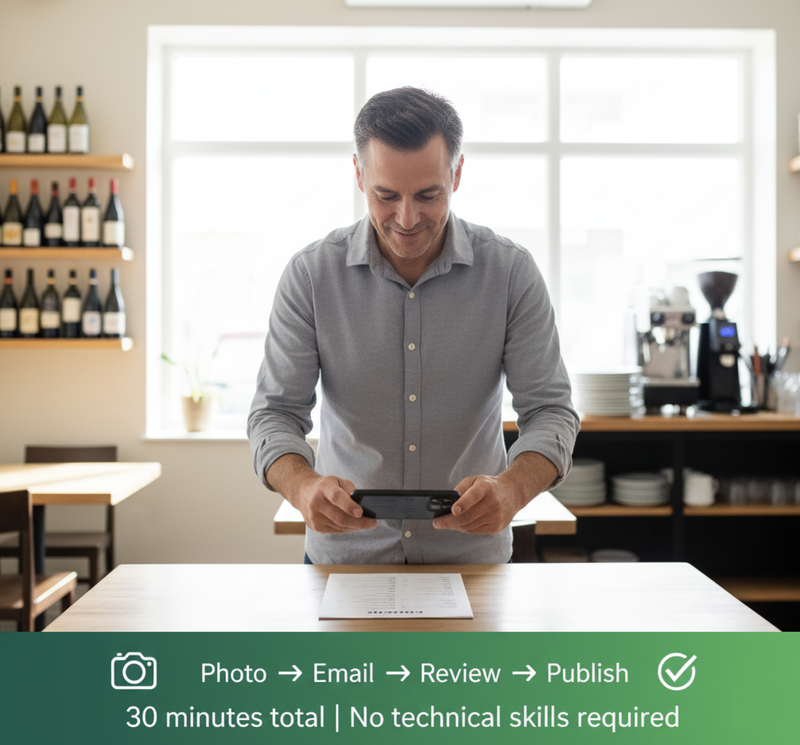
Digital menu setup takes 30 minutes total over 3 days. Photo menu, email, receive preview, approve, print QR code. No technical skills required. Break-even: 4 days.
It's Simpler Than You Think
"I'm not technical. Setup sounds complicated. I don't have time for IT projects."
This is the #2 objection after customer resistance. Restaurant owners imagine digital menu setup involves:
- Complex software installation
- Technical skills beyond their comfort zone
- Hours of data entry
- Coordination with IT consultants
- Disruption to operations
The reality: 30 minutes total across 3 days. No technical skills required. No IT consultant needed. Zero operational disruption.
The process:
- Photograph your current menu (10 minutes)
- Email photos to EasyMenus (2 minutes)
- Receive digital preview in 24 hours
- Review and request adjustments (15 minutes)
- Print QR codes (5 minutes)
- Operational by Day 4
Break-even timeline: 4-7 days. First avoided printing bill = setup time investment recovered.
Start your actual 3-minute setup—see how simple it really is
Why Restaurant Owners Overestimate Setup Complexity
The IT Project Mental Model (Wrong)
What owners imagine:
- Purchase software that needs installation
- Learn complex admin interface
- Manually enter every menu item with typing
- Configure settings and technical options
- Debug problems when it doesn't work
- Train staff on how to manage system
- Time investment: 8-15 hours over several weeks
This mental model comes from experience with:
- POS system implementations (weeks of setup, training, debugging)
- Website builders (hours fighting with templates and design)
- Booking systems (complex configuration, staff training)
- Accounting software (data migration, learning curves)
Restaurant owners reasonably think: "Another technology system = another IT project I don't have time for."
The Actual Process Model (Correct)
What actually happens:
- Take photos with phone you already own (10 minutes)
- Email photos—that's your "data entry" (2 minutes)
- EasyMenus does the setup work (you wait 24 hours, zero time from you)
- You review and approve (15 minutes)
- Print QR code at local shop (5 minutes)
- Operational (Day 4)
Time investment: 32 minutes over 3 days, none of it requiring technical skills.
This matches restaurant owners' actual skills:
- Can take smartphone photos? You qualify.
- Can send email? You qualify.
- Can review menu for accuracy? You qualify.
- Can print PDF at local shop? You qualify.
No technical skills beyond "smartphone owner who uses email" required.

The Actual 3-Day Timeline: What Really Happens
Day 1, Morning (12 Minutes Total)
9:00am: You decide to try digital menus.
9:02am: Go to easymenus.xyz/signup, create account (name, email, restaurant name). Takes 3 minutes.
9:05am: You receive confirmation email with instructions: "Please photograph your current menu and email to setup@easymenus.xyz"
9:10am: You take smartphone photos of your current printed menu:
- Main menu pages (4-6 photos)
- Wine list if separate (2-3 photos)
- Daily specials board if you have one (1 photo)
Photo tips:
- Adequate lighting (near window during daytime is fine)
- Readable text (doesn't need to be perfect, just clear enough to read)
- Each page separately (don't try to photograph entire open menu at once)
- Include prices clearly visible
9:20am: You email photos to setup@easymenus.xyz with brief description:
"Amsterdam restaurant near Vondelpark. Need Dutch, English, German versions. Approximately 35 items plus wine list. Modern European cuisine."
9:22am: You receive automatic confirmation: "Photos received. Your digital menu preview will be ready within 24 hours. We'll email when it's available for review."
Total time invested Day 1: 12 minutes
Day 2, Afternoon (15 Minutes Total)
2:30pm: You receive email: "Your digital menu is ready for review" with link.
2:32pm: You click link, opens in web browser. You see your menu digitally formatted:
- All items from your photos (extracted automatically)
- Prices in euros as shown on your printed menu
- Descriptions based on your printed menu text
- Dutch, English, and German versions (translations done)
- Categories organized (Starters, Mains, Desserts, Drinks)
- QR code displayed and ready to download
2:35pm: You review for accuracy. You notice:
- Stamppot description could be clearer for international customers
- North Sea fish price slightly different from current supplier cost
- Want to add allergen information for 5 dishes
- One wine name spelled incorrectly
2:40pm: You click "Request Changes" button, type:
"Please update:
- Stamppot description: Add 'Traditional Dutch comfort food with mashed potatoes, seasonal vegetables, and smoked sausage'
- North Sea fish: Change price to €24.50 (not €23.50)
- Add allergen warnings: [list dishes and allergens]
- Wine spelling: 'Château' not 'Chateau' for the Bordeaux"
2:45pm: You submit. Receive confirmation: "Changes will be applied within 2-4 hours. You'll receive email when updated version is ready."
Total time invested Day 2: 15 minutes
Day 2, Evening (2 Minutes)
6:15pm: You receive email: "Your requested changes have been applied. Please review and approve."
6:16pm: You click link, review changes. All corrections applied correctly.
6:17pm: You click "Approve Final Version" button.
6:18pm: You receive email with:
- Confirmation menu is now live
- QR code download link (PDF file formatted for printing)
- Instructions for printing and displaying QR codes
Total time invested Day 2 evening: 2 minutes
Day 3, Morning (5 Minutes)
10:00am: You go to local print shop (or use your office printer if you have one).
10:02am: You print QR code PDF:
- Table tent format: 15 copies (one per table)
- OR simple cards format: 20 copies
- OR poster format: 2 copies for front entrance and bar
Cost: €8-15 for professional table tents, or €0 if using office printer.
10:05am: Return to restaurant, place QR codes on tables.
Total time invested Day 3: 5 minutes
Day 3, Lunch Service: Operational
12:00pm: First customers arrive. Server explains: "We now offer digital menus via QR code—just scan with your phone camera. I have printed versions if you prefer."
Most customers scan immediately. A few ask questions ("How do I scan?" → show them once). 2-3 customers request printed backup menus.
You're operational. Total time invested across 3 days: 34 minutes.
Real Restaurant Examples: What Actually Happened
Restaurant De Waag (Amsterdam): The "Non-Technical" Owner
Owner profile: 61 years old, self-describes as "barely comfortable with smartphones beyond WhatsApp and email."
Initial worry: "I'm not technical. This will be complicated and frustrating. I'll need help from younger staff or consultant."
Actual experience:
Wednesday 2:00pm: Sent menu photos via email (took longer than average because she carefully photographed each page twice to ensure clarity). Time: 18 minutes.
Thursday 11:00am: Received digital preview. Reviewed while having morning coffee. Requested three small changes (price updates, one description clarification). Time: 12 minutes.
Thursday 4:00pm: Approved final version. Time: 3 minutes.
Friday 9:00am: Printed QR codes at local copy shop on way to restaurant. Time: 7 minutes.
Friday 11:00am: Placed QR codes on tables before lunch service. Time: 5 minutes.
Total time: 45 minutes over 3 days.
Owner's conclusion: "I was completely wrong about complexity. This was easier than calling the print shop to order new menus, easier than coordinating with graphic designer, easier than any restaurant task I do regularly. The only 'technical' skill required was taking smartphone photos—which I already do for Instagram. If I can do it, literally anyone can."
Café Modern (Amsterdam Noord): The Busy Operator
Owner profile: Mid-40s, comfortable with technology but extremely time-constrained running high-volume operation.
Initial worry: "I understand the value but don't have 4-5 hours to set up new systems. I'm working 70-hour weeks—when would I find time for this?"
Actual experience:
Monday 7:00am: Photographed menu during morning prep before staff arrived. Time: 8 minutes.
Monday 7:10am: Emailed photos from phone while having first coffee. Time: 2 minutes.
Tuesday 3:00pm: Reviewed preview during afternoon service gap. Requested minor changes. Time: 10 minutes.
Tuesday 7:00pm: Approved final version between dinner services. Time: 2 minutes.
Wednesday 9:00am: Printed QR codes using restaurant office printer. Time: 4 minutes.
Total time: 26 minutes over 3 days —all in small gaps between regular tasks.
Owner's observation: "Setup took less time than my weekly ordering calls to suppliers. I did it in random 5-10 minute gaps over three days—early morning, between services, evening lull. Never felt like I was 'spending time on IT project.' It was less disruptive than changing our coffee supplier."
Bistro Bis (Amsterdam Canal District): The Perfectionist
Owner profile: High standards, concerned about brand quality, wanted perfect implementation.
Initial worry: "Generic QR menu systems look cheap. Our brand requires elegant execution. This will need significant customization and back-and-forth to get right."
Actual experience:
Monday afternoon: Photographed menus. Also sent detailed brand guidelines, color preferences, design notes. Time: 25 minutes (thorough approach).
Tuesday: Received preview. Requested several aesthetic adjustments—font choices, spacing, description formatting, wine list organization. Time: 30 minutes (detailed review).
Wednesday: Received updated version. Requested further refinements to match exact brand voice. Time: 20 minutes.
Thursday: Approved final version after third iteration. Time: 10 minutes.
Friday: Coordinated with designer to create custom QR code table holders matching restaurant aesthetic. Time: 15 minutes.
Total time: 100 minutes over 5 days.
Owner's conclusion: "Even with my unusual level of perfectionism and brand-specific requirements, total time was under 2 hours spread across a week. Standard setup for less particular operators would be half that. The system accommodated my detailed feedback without requiring technical knowledge—I just described what I wanted in plain language, they implemented it."
Common Questions: What Restaurant Owners Ask About Setup
What if I don't have all my menu information organized?
You don't need organized information. You need readable photos.
If your current printed menu exists, it contains all necessary information. Photograph it. Done.
If you're creating new menu from scratch: Yes, that takes time—but that time is required regardless of digital or printed menus. The digital setup doesn't add time, it just processes information you already need to create.
Most common scenario: You have printed menus that need updating. Photograph current version, note changes you want during review phase. This is faster than creating new print files from scratch.
What if I need to make changes after going live?
This is the primary advantage of digital menus.
To update after launch:
- Log into EasyMenus dashboard (web browser, any device)
- Click item you want to change
- Edit price, description, availability, etc.
- Click "Save"
Time: 30-90 seconds per change. Updates appear immediately for customers scanning QR codes.
Compare to printed menus:
- Contact print shop: 10 minutes
- Coordinate changes: 15 minutes
- Approve proofs: 10 minutes
- Wait for printing: 3-4 days
- Pay €160-280
- Distribute new menus: 15 minutes
Digital wins dramatically on post-launch flexibility.
Do I need to train my staff?
Minimal training required—one 5-minute conversation:
What servers need to know:
- "We now offer digital menus via QR code"
- "Customers scan with phone camera, menu opens automatically"
- "They can select language and view detailed information"
- "We have printed backups for customers who prefer them"
- "If customers ask how to scan, demonstrate once: point camera at code, tap link"
That's it. No complex system to learn, no admin interface for servers, no technical troubleshooting required.
**Most servers learn by watching customers use it—**no formal training needed beyond initial explanation.
What if something goes wrong during setup?
Define "wrong":
Common "problems" that aren't actually problems:
- Photos aren't professional quality → Doesn't matter, just needs to be readable
- Spelling errors in current printed menu → You'll catch them during review phase and fix
- Not sure how to describe dishes → Use your current printed menu descriptions, refine later if desired
Actual technical problems (rare):
- Email with photos doesn't send → Try again, or contact support
- Preview link doesn't open → Check spam folder, or contact support
- Changes not applied correctly → Request correction, usually fixed within hours
EasyMenus provides support: If something genuinely doesn't work, email support@easymenus.xyz with specific issue. Response time: Usually within 2-4 hours, often faster.
Reality: Most restaurant owners complete setup without any problems or support contact. System designed for non-technical users with common failure points anticipated and prevented.
What about my wine list specifically?
Exactly the same process.
If your wine list is separate from main menu:
- Photograph it separately (2-4 photos depending on length)
- Include in initial email: "Also attached: wine list"
- Review wine list section during Day 2 preview
- Update wine selection later by logging in (30 seconds per change)
Many restaurants find wine list is the highest-value digital conversion: Wine inventory changes frequently, printed lists become outdated quickly, digital updates in real-time when bottles sell out.
Why This Process Is Designed for Restaurant Owners Specifically
Acknowledges Your Actual Constraints
Restaurant owners don't have:
- 4-5 hour blocks for IT projects
- Technical troubleshooting skills
- Patience for complex software
- Time for trial-and-error learning
- Staff to delegate technical tasks to
This process requires:
- 10-15 minute gaps over 3 days (fit between regular tasks)
- Smartphone photography skills (if you use Instagram, you qualify)
- Email capability (which you already use)
- Ability to review menu for accuracy (your core expertise)
- No technical knowledge beyond "smartphone user"
Design philosophy: Make it possible for the exhausted restaurant owner working 70-hour weeks to set up digital menus using only the skills they already have in the tiny time gaps that actually exist in their schedule.
Removes Technical Barriers
You don't:
- Install software
- Configure servers or hosting
- Learn admin interfaces
- Write code or edit templates
- Troubleshoot technical problems
- Manage updates or maintenance
You do:
- Take photos (skill you have)
- Send email (skill you have)
- Review menu accuracy (core expertise)
- Print PDF (basic task anyone can do)
All technical work happens on EasyMenus side. Your role is providing information (via photos) and verifying accuracy (via review)—not implementing technology.
Fits Restaurant Operations Reality
Setup happens in small gaps:
- Morning before staff arrives: 10 minutes
- Afternoon lull between services: 15 minutes
- Evening after close: 5 minutes
- On your phone while commuting: 2 minutes
You never need dedicated "project time." Just small moments that already exist in your schedule.
Zero operational disruption: No need to close for setup, no need to change workflows during implementation, no customer impact until you choose to place QR codes.
What Happens After Setup: The Long-Term Reality
Month 1: Learning Phase
Week 1-2: You're adjusting to instant update capability. When suppliers change prices or you want to add specials, you log in and update (still feels novel).
Week 3-4: Updates become routine. You stop thinking about "digital menu system" and just think "I need to update the fish price—done."
Time spent on menu management Month 1: Approximately 30-45 minutes (mostly exploring features and making adjustments you've wanted to make for months but printing costs prevented).
Month 2-3: Automation Phase
Updates become instant reflex:
- Supplier changes price → Update immediately (30 seconds)
- Wine bottle sells out → Remove from menu (20 seconds)
- Seasonal ingredient arrives → Add special (60 seconds)
Time spent on menu management Months 2-3: Approximately 15-20 minutes monthly (only actual necessary changes, no coordination overhead).
Month 4+: Invisible Infrastructure Phase
**Digital menus become like contactless payment or online reservations—**invisible infrastructure you don't think about.
You update when needed (30-90 seconds) and never think about the system itself.
Time spent monthly: 10-15 minutes (less time than single call to print shop previously required).
Mental energy: Nearly zero. It's just how menus work now, no longer a "system" or "technology"—just normal operations.
The Bottom Line: Setup Is Simpler Than You Think
Restaurant owners overestimate setup complexity by 5-10× because they mentally categorize digital menus as "IT project" rather than "menu photography task."
The actual process:
- 30-35 minutes total time across 3 days
- No technical skills beyond smartphone photography and email
- Zero operational disruption
- Break-even in 4-7 days when you avoid first printing bill
The barrier isn't technical capability—it's psychological:
- Fear it's more complicated than it is
- Assuming you need skills you don't have
- Imagining time requirements that don't exist
- Waiting for "perfect moment" that never comes
The reality: You already have all skills required. You already have enough time (in small gaps). Setup is simpler than ordering from new supplier or training new staff member.
Every week you delay costs €110-270 in avoidable printing expenses while waiting for perfect moment that's already here.
Related Articles: